
How AI Agents Read Web Pages: Markdown Negotiation, WebMCP, and a 10-Second Check
AI agents read your pages over plain HTTP. Learn how Accept: text/markdown content negotiation works, which agents honor it, what WebMCP changes, and how to check any URL in seconds.
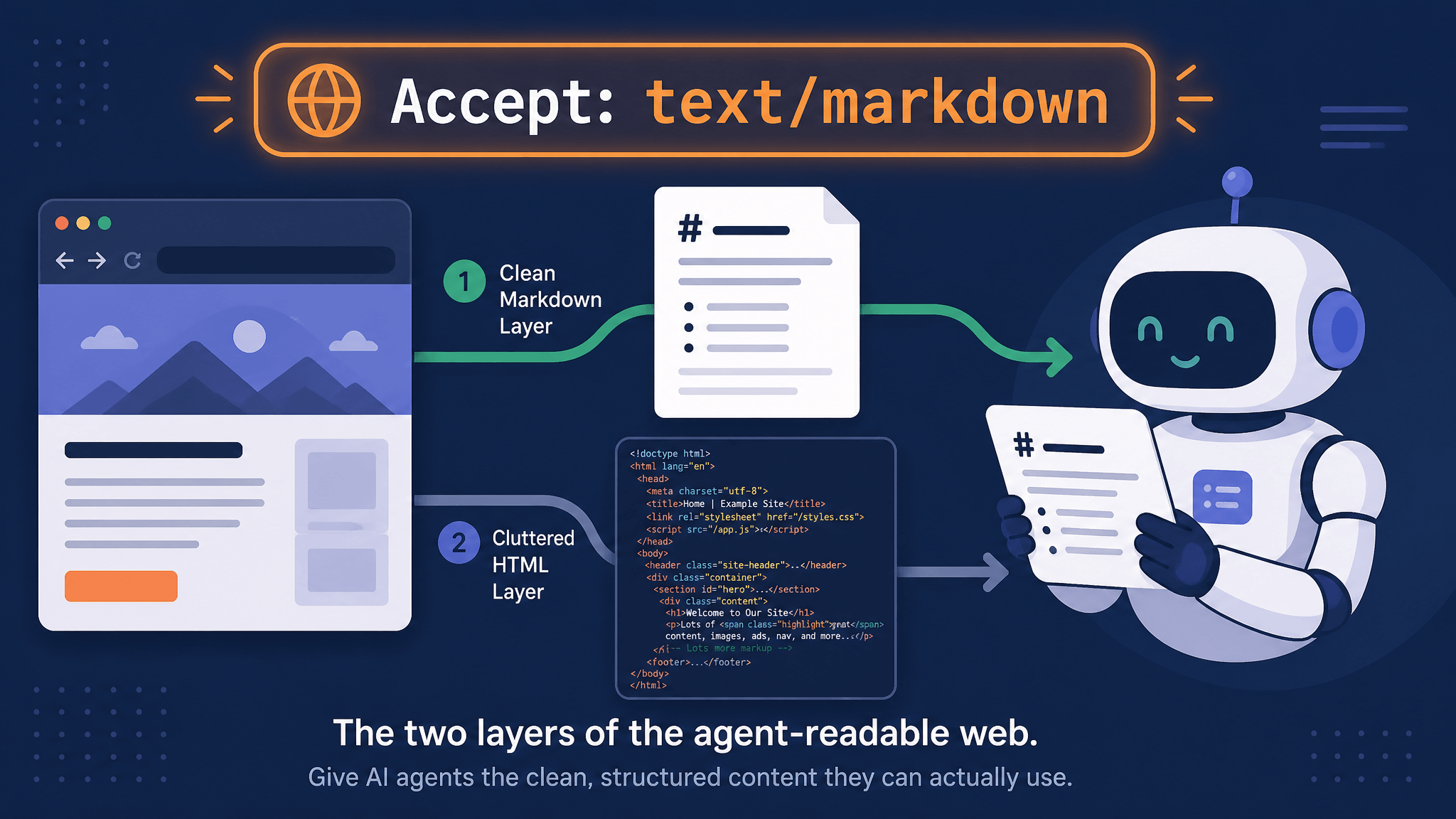
An AI agent never admires your hero image. When a browsing agent, a coding assistant, or a RAG pipeline needs your page, it sends an ordinary HTTP request, reads whatever bytes come back, and squeezes them into a context window. For most sites today that means HTML: navigation bars, tracking scripts, cookie banners, and layout wrappers that all have to be stripped before the actual content reaches the model. Two newer layers of the web are changing that. The first lets agents ask for clean Markdown with an HTTP header. The second — WebMCP — lets your page declare what it can do, so agents stop guessing at your buttons. This article explains both layers, shows which agents actually support them today, and gives you a ten-second check for any URL.
Key takeaways
- AI agents read pages by fetching URLs over HTTP and converting the response to text — usually by stripping HTML, which burns tokens on markup the model never needed.
- The
Accept: text/markdownconvention uses standard HTTP content negotiation to serve a Markdown variant of the same URL that browsers see — fewer tokens, cleaner retrieval, faster responses. - Support is real but uneven: coding agents like Claude Code, GitHub Copilot, and Cursor send the header; consumer assistants like ChatGPT browse and Gemini still fetch HTML only.
- Correct implementation is mostly about caching: without
Vary: Accept, caches will serve Markdown to browsers and HTML to agents. - WebMCP goes further than reading: pages register typed tools that agents call directly in the user’s logged-in session. It’s a Chrome origin trial from Chrome 149 — promising, but still a draft.
What actually happens when an agent reads your page
Strip away the science-fiction framing and an agent’s “reading” is plain HTTP. The agent’s fetch tool requests your URL, receives a response, and turns it into text the model can use. Because most sites return HTML, the agent (or an extraction layer in front of it) strips tags, drops scripts and styles, and hopes the residue is the article rather than the navigation.
That pipeline works, but it’s wasteful in a specific currency: tokens. HTML carries far more bytes than the prose it wraps — class attributes, inline scripts, accessibility markup, layout containers. An agent that reads ten pages has spent a meaningful share of its context window on markup before the model reasons about a single sentence. The same waste shows up in retrieval: when a RAG pipeline embeds page text that includes cookie-banner leftovers and related-post rails, the vectors get noisier.
There’s a second, different mode worth separating: actuation. Browser-driving agents — the kind that click buttons and fill forms — may read an accessibility tree or screenshots instead of raw HTML. That’s how they operate a page. But operating starts with reading, and reading is where the next layer helps.
The reading layer: Accept: text/markdown
HTTP has had an answer for “same resource, different formats” since forever: proactive content negotiation (RFC 9110 §12.5.1). The client says what it accepts; the server picks the representation. The text/markdown media type has been registered since RFC 7763. The convention popularized by acceptmarkdown.com combines the two: when a request carries Accept: text/markdown, serve the Markdown variant of that URL; when a browser asks for HTML, serve the page. The URL stays the same — no /index.md split-brain, no duplicate content.
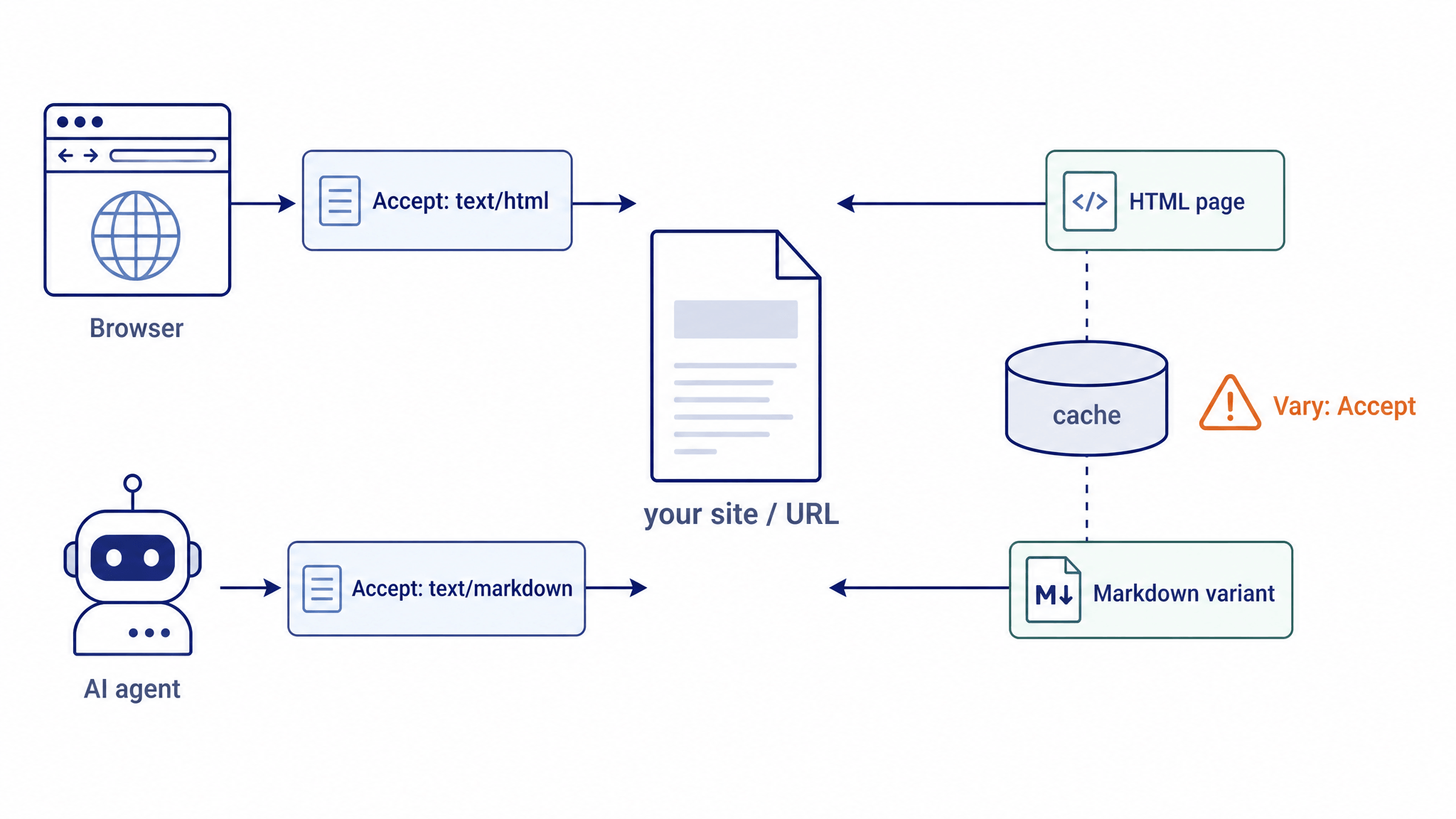
The site’s guides make the economics concrete:
- Tokens — Markdown drops nav, styles, scripts, and layout wrappers, so agents spend context on your prose instead of your DOM.
- Retrieval — no ads or overlay junk muddying what a RAG pipeline embeds.
- Latency — less to fetch, parse, and stuff into context before the model starts thinking.
Serving the variant is the easy part; doing it correctly is where most implementations stumble:
- Send
Vary: Accept. Without it, CDNs and browsers cache one representation and serve it to everyone — Markdown to Chrome, HTML to your agent. RFC 9110 §12.5.5 exists for exactly this. - Respect q-values. Agents send ranked preferences like
text/markdown, text/html;q=0.9, */*;q=0.7. Matching means ranking, not substring checks. - Don’t 406 eagerly. Returning
406 Not Acceptablewhenever the exact media type isn’t offered breaks clients that would happily take HTML. Fail on genuinely unsatisfiable requests only.
You also need Markdown to serve. Three approaches cover every stack: render from a source of truth (your CMS already stores Markdown), dual-render at build time, or convert HTML to Markdown at runtime. Cloudflare even ships a managed Markdown for Agents feature that negotiates at the edge with no origin changes.
Which agents actually send the header
This is where optimism meets data. acceptmarkdown.com maintains a dated support matrix, verified against observed behavior:
| Agent | Sends Accept: text/markdown? |
Notes |
|---|---|---|
| Claude Code (Anthropic) | Yes | text/markdown, text/html, */* |
| GitHub Copilot (Chat & CLI) | Yes | verified June 2026 |
| Microsoft Copilot | Yes | verified June 2026 |
| Cursor | Yes | text/markdown, text/plain;q=0.9, */*;q=0.8 |
| OpenClaw, OpenCode | Yes | verified May 2026 |
| Codex CLI (OpenAI) | Partial | fetches HTML first, then follows <link rel="alternate" type="text/markdown"> to the .md sibling |
| ChatGPT (browse), Claude.ai web, Gemini web & CLI, Aider, Cline, Devin | No | fetch HTML only |
Two practical consequences. First, if your audience is developers using coding agents, markdown negotiation already reaches them. Second, that Codex CLI row — the HTML-first client that follows a <link rel="alternate" type="text/markdown" href="…page.md"> pointer — is a free compatibility win: advertise the Markdown sibling in your document head and you cover a client the header alone doesn’t.
Check any URL in ten seconds
You don’t need a dashboard to know what agents see. Two curl commands are enough:
# Headers: does the server negotiate?
curl -sI -H "Accept: text/markdown" https://example.com/page

# Body: what actually comes back?
curl -s -H "Accept: text/markdown" https://example.com/page
I ran both while writing this article. Against acceptmarkdown.com itself — a live implementation — the header check returns content-type: text/markdown; charset=utf-8 plus the all-important vary: Accept, and the body starts with a clean # heading instead of a <!DOCTYPE html>:
$ curl -sI -H "Accept: text/markdown" https://acceptmarkdown.com/
HTTP/2 200
content-type: text/markdown; charset=utf-8
vary: Accept
Against example.com, a site that doesn’t implement negotiation, the same request returns 200 with content-type: text/html — the server simply ignores the header, which is the correct default behavior for a non-negotiating site (some misconfigured servers instead return errors, which breaks agents that would have accepted HTML). acceptmarkdown.com also runs a hosted checker that grades a URL on negotiation, Vary, 406 handling, and q-values.
The action layer: WebMCP
Reading fixes what agents know about your page. WebMCP addresses what they can do on it. Per Chrome’s documentation, WebMCP is “a proposed web standard to help you build and expose structured tools for AI agents” — developed by Google (Chrome) and Microsoft (Edge) contributors in the W3C Web Machine Learning Community Group. Instead of an agent reverse-engineering your UI, your page registers tools with names, descriptions, and JSON Schemas. The agent discovers them, calls one with structured arguments, and your own JavaScript executes — visibly, in the tab, inside the user’s real logged-in session.
Three pieces carry the design: discovery (a standard way to list a page’s tools), schemas (typed inputs and outputs, so the agent passes what your code expects), and state (what’s actually on the page right now). Because the tool contract — not the layout — is the interface, a redesign doesn’t break the agent. And because execution happens where the user can see it, with sensitive actions gated by explicit confirmation, the site stays in control of what an agent may do.
Maturity check: this is real and runnable but early. WebMCP is a Community Group draft, “subject to change” by its own documentation. Chrome offers an origin trial from Chrome 149 and a local flag (chrome://flags/#enable-webmcp-testing). OpenAI reported ChatGPT desktop-browser support in August 2026, which makes this a two-vendor direction rather than a Chrome experiment. A useful design habit from early deployments: tier your tools — read-only tools stay ungated, reversible actions get lightweight confirmation, and only genuinely consequential acts (payments, submissions) demand explicit human approval.
Which layer should you ship?
- Documentation, blog, reference content → markdown negotiation is cheap and standardized; implement
Accept: text/markdownwithVary: Accept, and add the<link rel="alternate">pointer for HTML-first clients. Staticllms.txtfiles are a weaker but zero-risk floor. - Apps with actions — checkout, booking, dashboards → you’re in WebMCP territory. Today: prototype behind the flag, register one read-only tool, and watch an agent call it. Production waits for the draft to stabilize.
- Everyone → run the ten-second curl check on your own URLs. Knowing what agents currently get from your site is the prerequisite for both layers.
Getting Markdown from pages that don’t negotiate yet
Most of the web doesn’t negotiate, and you often need the Markdown now — for a knowledge base, a RAG pipeline, a citation archive. The practical bridge is a converter that renders the page and hands you clean Markdown: paste a URL, get the article’s headings, lists, and tables with the boilerplate stripped. URL to Any’s URL to Markdown tool does exactly this in the browser, free and without an account — the same output an agent would love to receive, on demand.
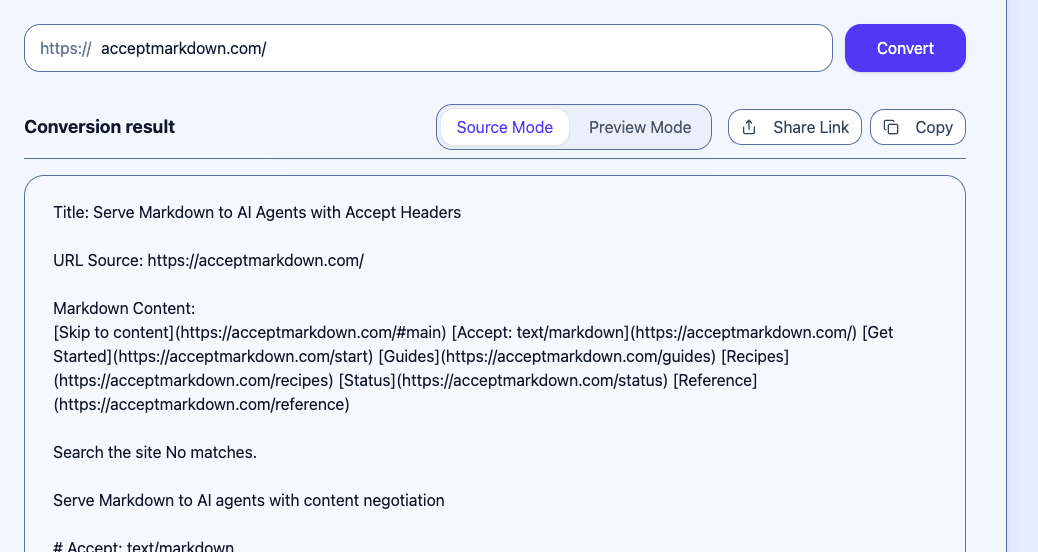
Converting https://acceptmarkdown.com/ with URL to Any’s free URL to Markdown tool (screenshot: urltoany.com/url-to-markdown, accessed 2026-08-30).
FAQ
Do all AI agents send Accept: text/markdown?
No. Coding agents lead adoption (Claude Code, GitHub Copilot, Cursor, OpenCode), while consumer assistants like ChatGPT browse and Gemini still fetch HTML only — so treat the header as a progressive enhancement, not a replacement for clean HTML.
Does serving Markdown hurt SEO?
Not when it’s done as standard content negotiation: same URL, and search crawlers still get HTML because they don’t send the Markdown preference. The failure mode to avoid is caching without Vary: Accept, which can serve the wrong variant to anyone.
Do I need WebMCP today? Not for most sites. It’s a draft standard in a Chrome origin trial — worth prototyping if your site is action-heavy, and worth understanding now because the “declare, don’t scrape” direction is where agent interaction is heading.
The takeaway
Agents read your page through plain HTTP, and what they get back is a choice you make. The reading layer — Accept: text/markdown — is standardized, cheap, and already honored by the agents developers use daily. The action layer — WebMCP — is earlier but moving fast toward “declare tools, don’t be scraped.” Between the two sits a check anyone can run: request your own URL with Accept: text/markdown and see what comes back. If the answer is HTML soup, at least you’ll know exactly what the machines are reading — and now you have the tools to change it.
Related Articles
PDF to Markdown: What LiteParse's September 2026 Update Changes
LiteParse 2.14.6 cuts PDF text extraction by 20–25%, lifts table accuracy on all three benchmarks, and adds block-level visual grounding plus an is-complex router. What the vendor-reported numbers say — and how to choose a PDF to Markdown approach.
Qwen3.8-Omni-Flash: Convert Web Pages to Markdown/JSON to Feed Multimodal Models
Qwen3.8-Omni-Flash takes text, image, audio, and video input with 1M context and cut hourly audio input prices by over 98%. See when to convert web pages to Markdown vs JSON for your AI pipeline — free, no install.

Cloudflare's Disallow AI Training: Impact on URL to Markdown Workflows
Cloudflare's Disallow AI Training setting separates search visibility from AI training. Here's what it changes for URL to Markdown extraction — and how to adapt.